 In our Royal TS V26 Beta overview, we briefly introduced the new RoyalVNC plugin.
Now let’s take a closer look.
RoyalVNC: A Complete Rewrite
The new RoyalVNC plugin replaces the integrated TightVNC plugin.
This is not a small update to the old implementation. The plugin has been completely rewritten in Swift and is built on a much more modern foundation. The result is better performance, better stability, and a cleaner base for future improvements.
In our testing, the new RoyalVNC plugin outperforms the previous TightVNC-based plugin and should work well with all common VNC servers.
So if your current VNC setup involves a mix of servers, platforms, and that one machine nobody wants to touch because “it still works,” this update should make things noticeably better.
Apple Remote Desktop Support
One of the biggest improvements is support for Apple Remote Desktop protocol extensions.
That means RoyalVNC can now do a lot more when connecting to macOS systems.
This includes support for Apple’s progressive video encoding, which can make remote sessions feel much smoother and more responsive. We also added dynamic resolution support, so the remote desktop can adapt when the session size changes instead of making you play “scrollbar archaeology.”
There is also a display selection, which is especially useful when connecting to Macs with multiple displays. Pick or switch the screen you actually need while connected.
Authentication has also been improved. You can now authenticate using a macOS user account instead of relying on a separate VNC password. That is more convenient, more in line with how macOS actually works, and one less password to remember.
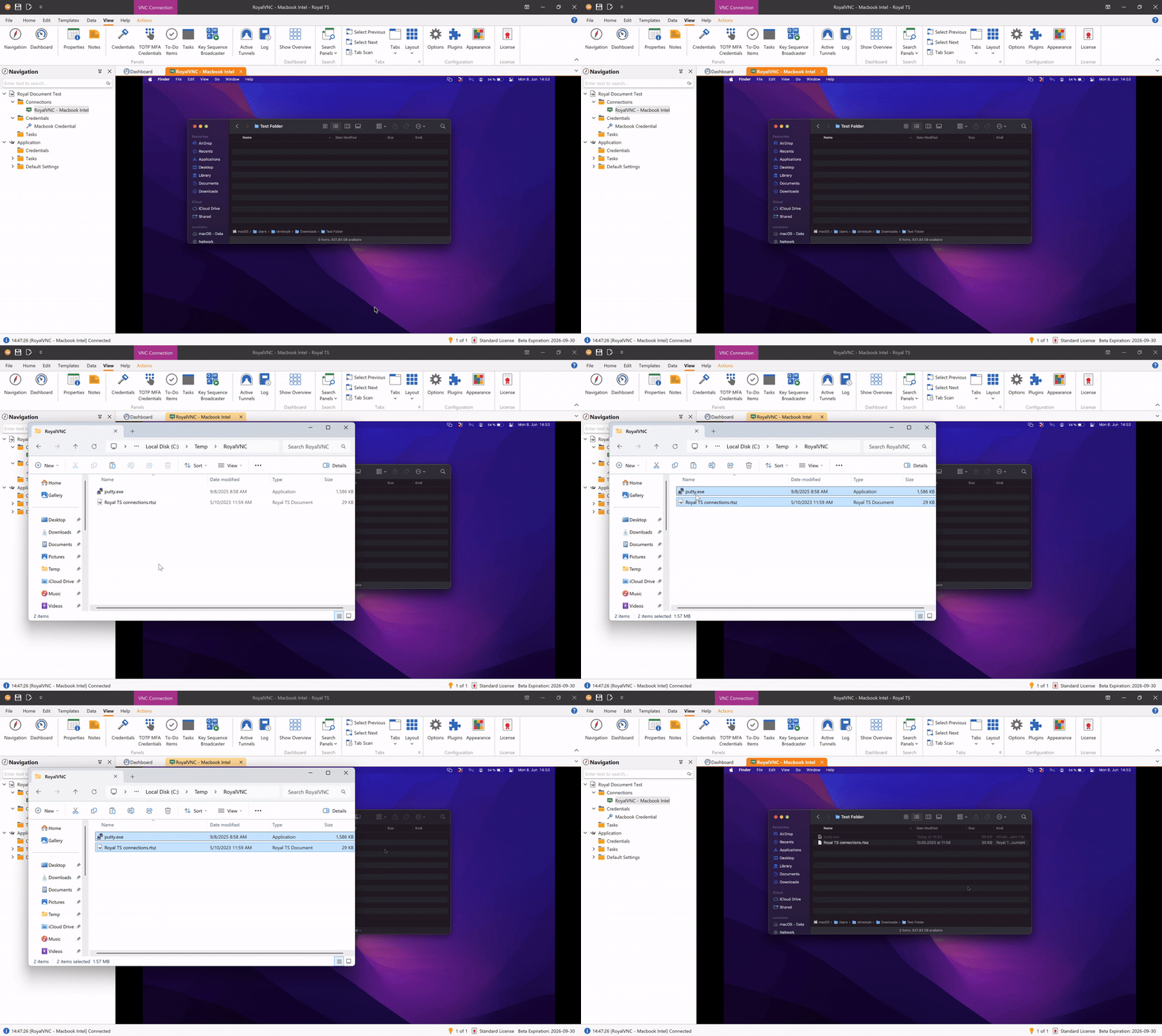
And yes, file transfer is supported too. You can now transfer files using drag and drop, which is exactly how file transfer should be implemented.
Important Change for macOS Connections
There is one important compatibility note.
Connecting to macOS using classic VNC authentication is no longer supported in the new RoyalVNC plugin.
If you previously connected to a Mac using a VNC password, you may need to update the credential used by your connection. Instead of the VNC password, use the actual macOS user account and password.
RealVNC and UltraVNC Authentication
The new plugin also adds support for additional authentication methods.
RoyalVNC now supports RealVNC authentication, which should help in environments where RealVNC servers are already part of the setup.
We also added UltraVNC MS-Logon II authentication support. If you are using UltraVNC with Windows account-based authentication, RoyalVNC is now much better suited for that. Please note that UltraVNC MS-Logon I is not supported.
Raspberry Pi VNC servers are now also supported out of the box, as these use the same authentication scheme (RSA AES) that RealVNC uses.
VNC may be an old protocol, but real-world environments still have plenty of variety. This update is about handling more of that variety directly inside Royal TS.
Process Isolation
Just like our new FreeRDP integration, RoyalVNC also uses process isolation.
That means VNC sessions run separately from the main Royal TS application. If a VNC session runs into trouble, it should no longer take the whole application with it.
Remote desktop protocols involve graphics, input, authentication, networking, resizing, and occasionally a server that has seen things. Keeping that work isolated makes Royal TS more robust, especially when you have many sessions open during a normal workday.
Replacing TightVNC
The new RoyalVNC plugin will directly replace the previous TightVNC plugin.
TightVNC served us well for a long time, but the new plugin gives us better performance, broader authentication support, Apple Remote Desktop features, process isolation, and a stronger technical foundation going forward.
So yes, the old TightVNC plugin finally gets to retire. It has earned a chair somewhere quiet.
Please Test the Beta
These VNC changes touch important workflows, especially if you connect to macOS systems or use RealVNC or UltraVNC servers. That is exactly why we would be grateful for your feedback.
You can download the Royal TS V26 Beta from here.
A few practical notes:
- Your V7 license key works with the V26 Beta.
- Royal TS V7 and Royal TS V26 can be used side by side.
- You can test the Beta without replacing your existing setup.
If you run into issues, please open a support ticket or post in our community forums.
So please try it with your VNC servers, especially macOS, RealVNC, and UltraVNC setups, and let us know what works, what does not, and what still feels rough around the edges. That feedback helps us make the final release much better.


