 In our Royal TS V26 Beta overview, we already mentioned that RDP has gotten quite a bit of attention in this release.
Now let’s take a closer look at some of those changes.
Because, yes, “RDP improvements” can mean anything from “we moved a checkbox three pixels to the left” to “your daily workflow just got noticeably better.” In this case, we are talking about the latter.
Microsoft RDP: More Control When You Need It
Royal TS V26 continues to support Microsoft’s RDP stack. But we also added a few extra features to make day-to-day usage more flexible.
External Process Mode with mstsc.exe
Some environments are picky. Some setups rely on the exact Microsoft client behavior. Some troubleshooting sessions start with "But does it work in plain mstsc?”
To address such cases, we added an external process mode using mstsc.exe.
Instead of embedding the RDP ActiveX control inside Royal TS, Royal TS can now launch the connection through Microsoft’s own Remote Desktop client process. This is useful if you want maximum compatibility with Microsoft’s client behavior, need to work around edge cases in embedded mode, or simply want to keep a specific RDP session outside the Royal TS process.
It is still managed from within Royal TS, but the actual session lives where Windows admins have spent many, many hours of their lives: in mstsc.exe.
Individual Screen Selection for Multi-Monitor Full Screen
Multi-monitor setups are great until an app decides that “use multiple monitors” means “all of them, always, no questions asked.”
Royal TS V26 gives you more control over your multi-monitor setups. For Microsoft RDP full-screen sessions, you can now select individual screens for multi-monitor use.
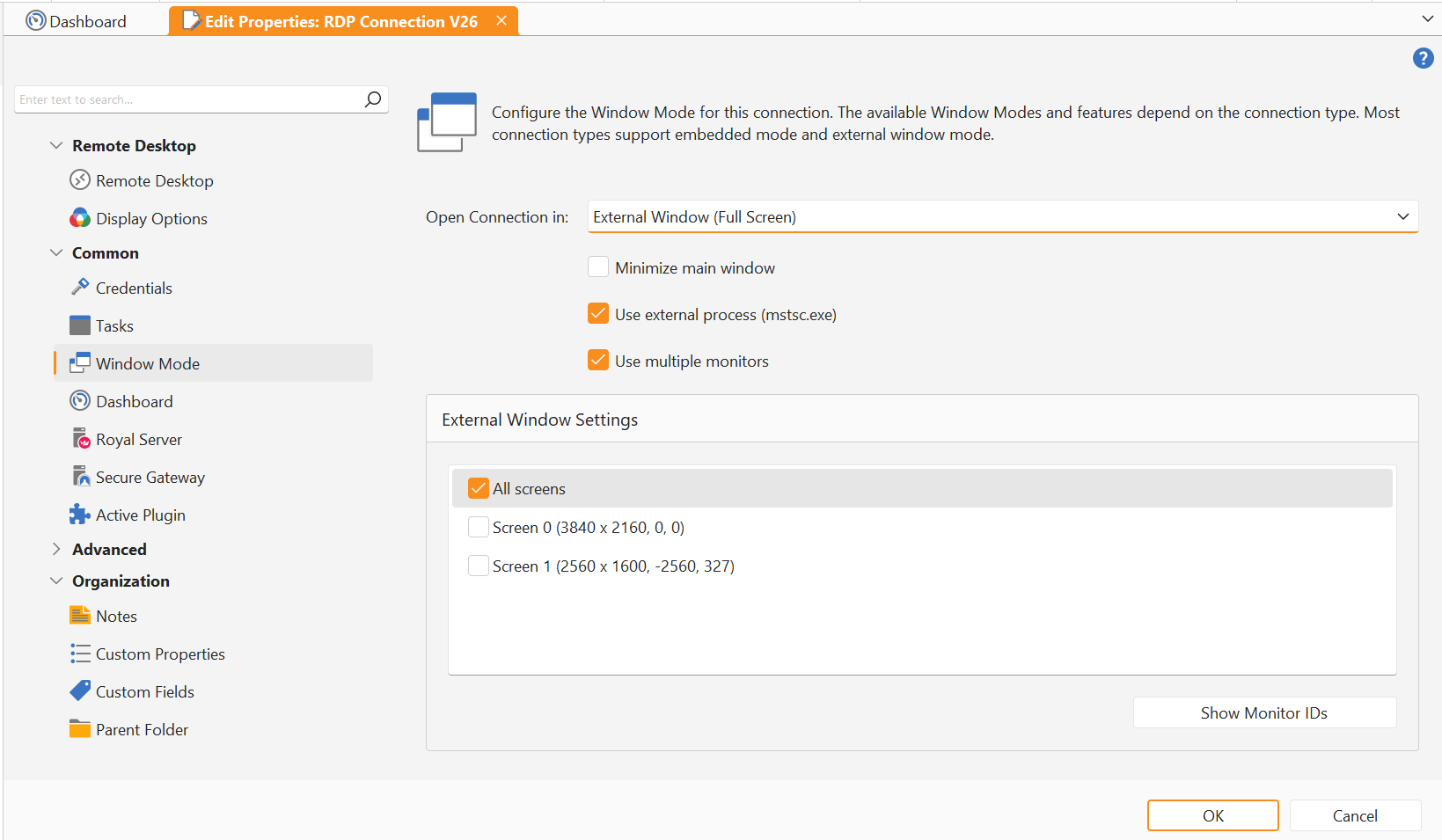
This is especially handy if you have three or four displays but only want the remote session on two of them. For example, keep your local chat, docs, monitoring, or snack-related spreadsheet on one screen, while the remote desktop gets the rest.
Small feature, big quality-of-life improvement.
KDC Proxy Support
Royal TS V26 also adds support for configuring a KDC proxy URL for Microsoft RDP when using MsRdpEx.
The short version: KDC Proxy allows Kerberos authentication traffic to go over HTTPS. This matters in scenarios where the client cannot directly reach a domain controller, which is common when connecting through a RD Gateway from outside the corporate network.
Without a KDC proxy, RD Gateway scenarios can fall back from Kerberos to NTLM. Such a downgrade may still connect, but it is not ideal from a security perspective. Kerberos gives you stronger authentication properties and is generally what you want to be using when Active Directory is involved and configured correctly.
Good use cases include:
- Remote access through a RD Gateway where domain controllers are not directly reachable
- Environments that want to avoid NTLM fallback
- Setups using Kerberos-based authentication across network boundaries
- Security-conscious deployments where “it connected somehow” is not quite enough
In other words, if you are using a RD Gateway and care about keeping authentication on the Kerberos path, this one is for you.
FreeRDP: A Much Tighter Integration
The FreeRDP connection type has also received a major upgrade in Royal TS V26.
Previously, Royal TS on Windows used wfreerdp.exe for FreeRDP-based connections. This worked, but it also meant living with the limitations of driving an external executable.
With V26, we are moving to our own FreeRDPKit implementation. This is the same foundation we have been using successfully on macOS for years, now brought into Royal TS for Windows.
This gives us a much tighter integration and a better base for future improvements.
Process Isolation
Even though the integration is tighter, FreeRDP sessions are still isolated in their own process.
This is intentional.
RDP is complex. Remote desktops involve graphics, input, networking, redirection, authentication, resizing, reconnecting, and occasionally a server that hasn't been treated the best. Keeping the FreeRDP session isolated means that if something goes wrong inside the RDP client layer, it is much less likely to affect the main Royal TS application.
So you get better integration without stuffing every moving part into the main process. A sensible compromise, and frankly, the kind of compromise that we gladly made.
More Settings You Already Know
Another big benefit of the new FreeRDPKit-based implementation is that many settings known from the Microsoft RDP plugin are now also available for FreeRDP connections.
For example, FreeRDP now supports more complete redirection options, including disk redirection. That makes FreeRDP a more capable choice for real-world workflows where access to local resources matters.
The smart reconnect feature has also gotten better and faster too. When the Royal TS window changes size, the remote desktop can adapt more smoothly to the new dimensions. Less fiddling, fewer awkward scroll bars, fewer “why is my remote desktop pretending it still lives in a tiny box?” moments.
Please Test the Beta
These RDP changes touch important workflows, and that is exactly why we would be grateful for your feedback.
You can download the Royal TS V26 Beta from the Royal TS Beta Release Notes page.
A few practical notes:
- Your V7 license key works with the V26 Beta.
- Royal TS V7 and Royal TS V26 can be used side by side.
- You can test the Beta without replacing your existing setup.
If you run into issues, please open a support ticket or post in our community forums.
So please try it in your setup and let us know what works, what does not, and what still feels rough around the edges. That feedback helps us make the final release much better.


